Everything You Need to Run the Place—In One Place
Donna pulls your Square POS data every night and turns it into the answers you’d spend hours digging for—then gives you the recipes, inventory, purchasing, and invoicing tools to act on them. Sales on one side, costs on the other, in the same system.
Connect Square in 5 minutes. No exports, no spreadsheets, no waiting.
Know If You’re Winning or Losing—At a Glance
You shouldn’t have to log into three systems to find out if last week was good or bad.
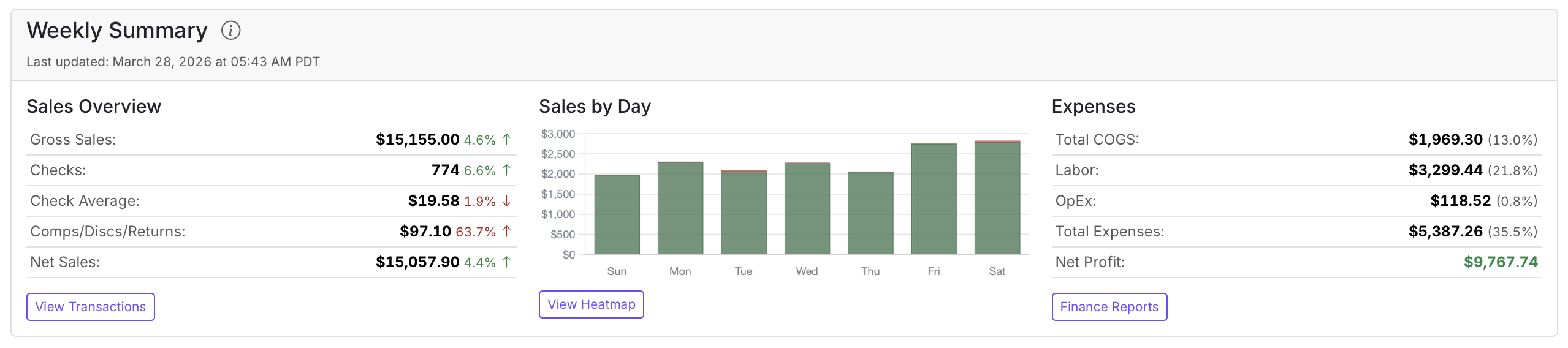
Donna’s dashboard puts revenue, expenses, guest counts, location performance, and your best-selling items on one screen—with period-over-period comparisons so trends jump off the page. Compare this week to last week, this month to last month, or any range you choose.
One screen. One minute. Full picture.
Staff to Demand, Not to Gut Feel
Labor is your biggest controllable cost. Stop guessing when the rush hits.
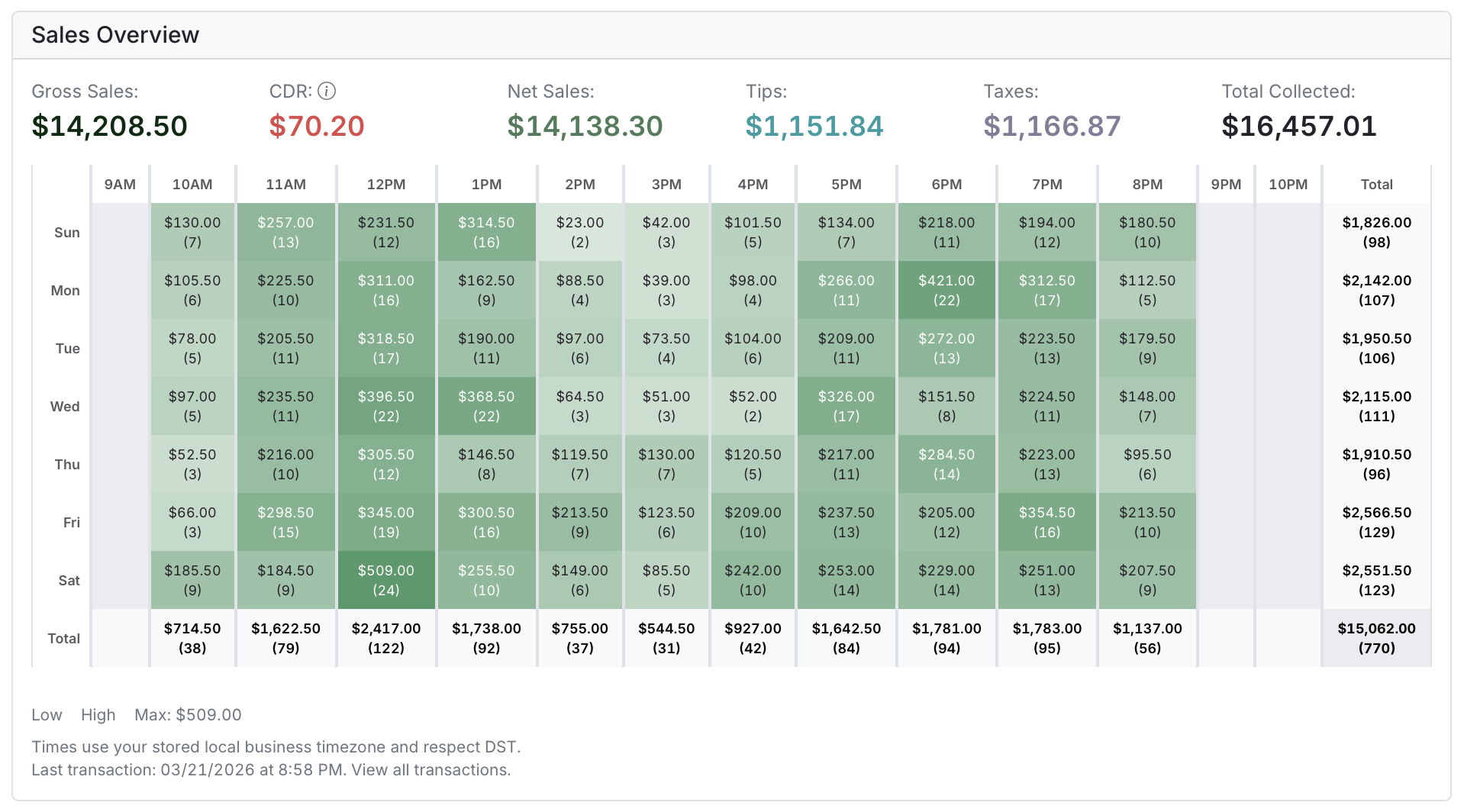
Donna shows you exactly when customers show up and when they don’t—hour by hour, day by day—so you can see where revenue concentrates across the week and how many people to put on the floor.
Schedule with confidence. Cut labor waste. Stop guessing about Tuesday lunch.
Turn Your Menu Into a Profit Engine
Your most popular item might be your least profitable.
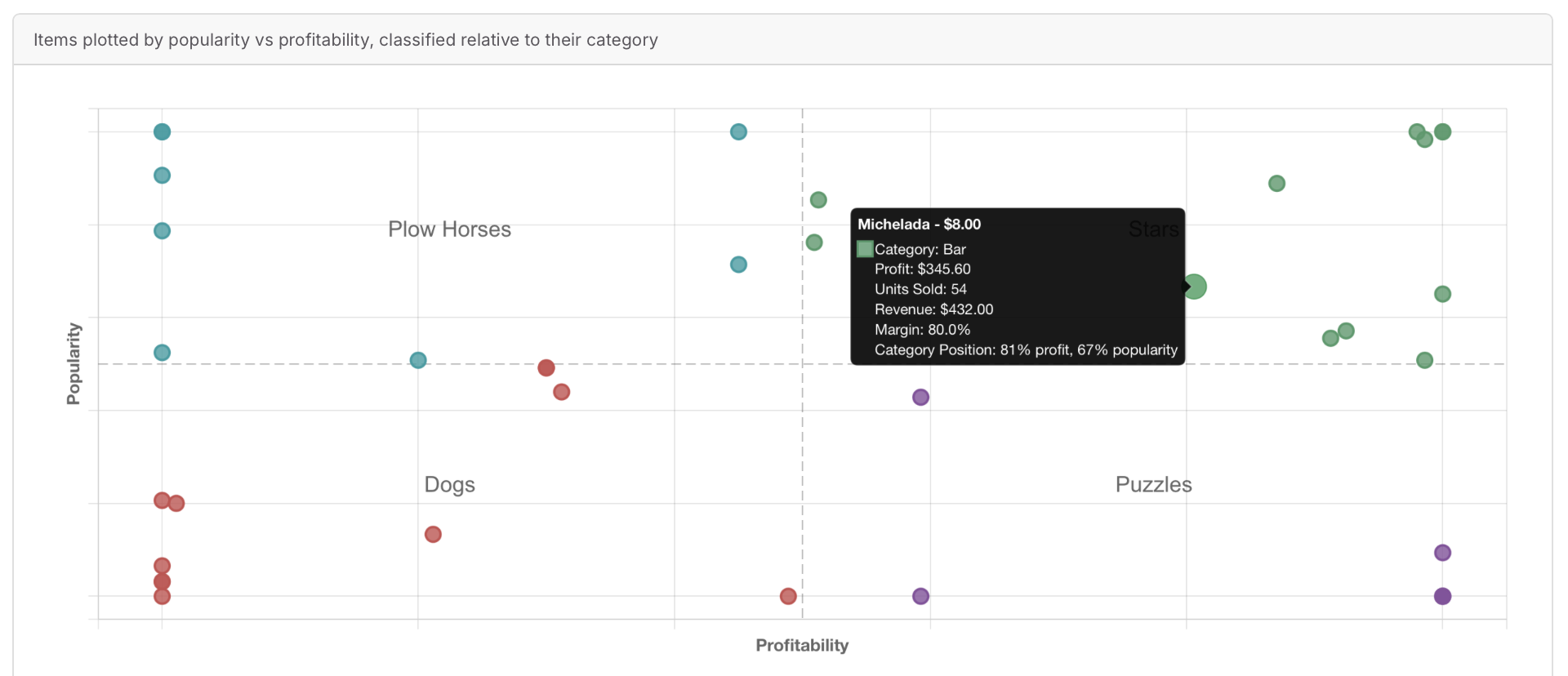
Menu Engineering classifies every item into four quadrants—Stars (high profit, high popularity), Plowhorses (popular but low margin), Puzzles (high margin but slow-moving), and Dogs (low margin, slow-moving)—so you see exactly where your menu makes money and where it leaks.
Product Mix shows whether you’re a bar that serves food or a restaurant that serves drinks—and when that balance starts to shift.
Price with data, not intuition. Promote what earns. Cut what drags.
Know the True Cost of Every Dish
A chef who says food cost is “around 30%” can’t tell you which dish is actually underwater.
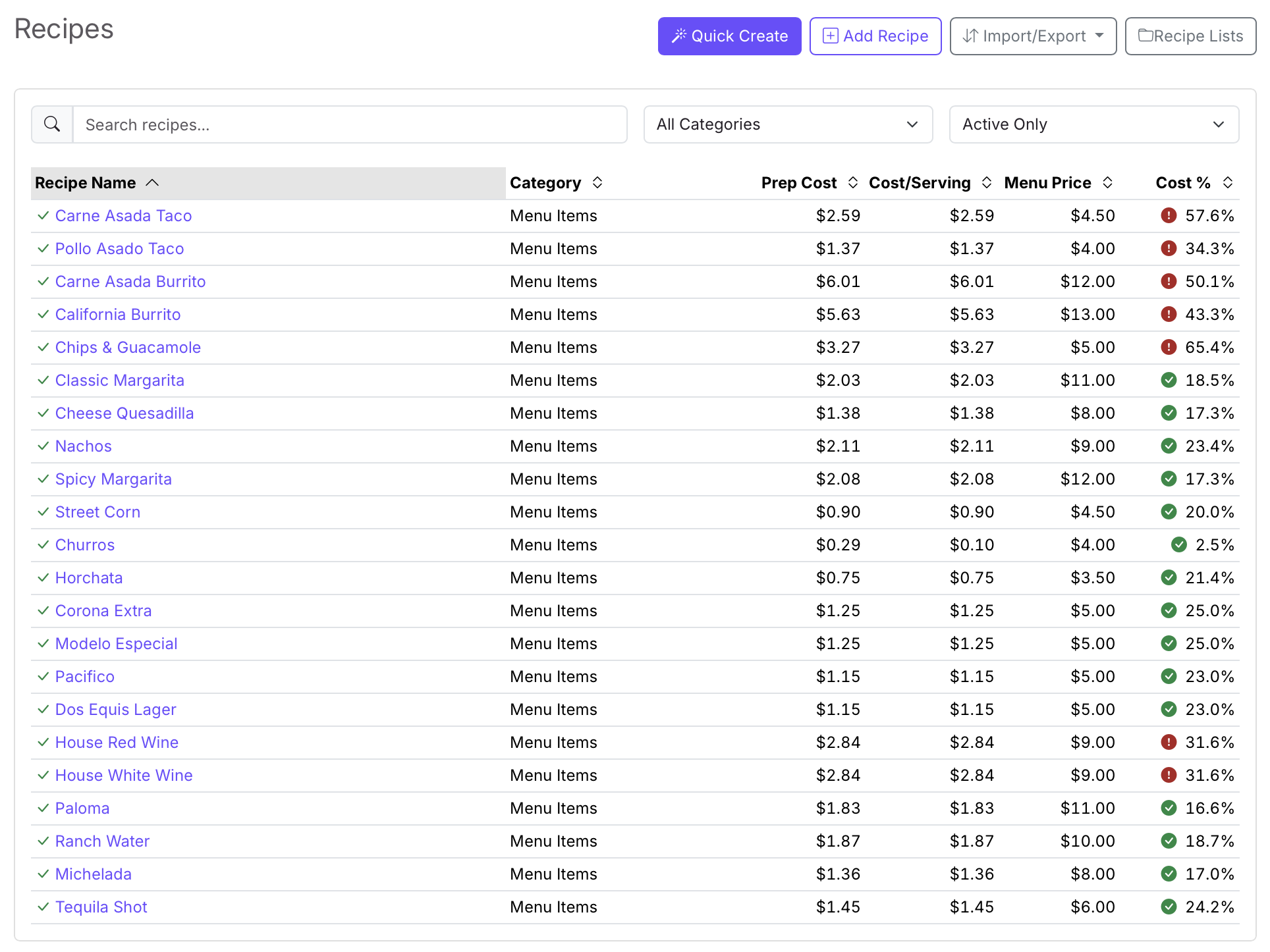
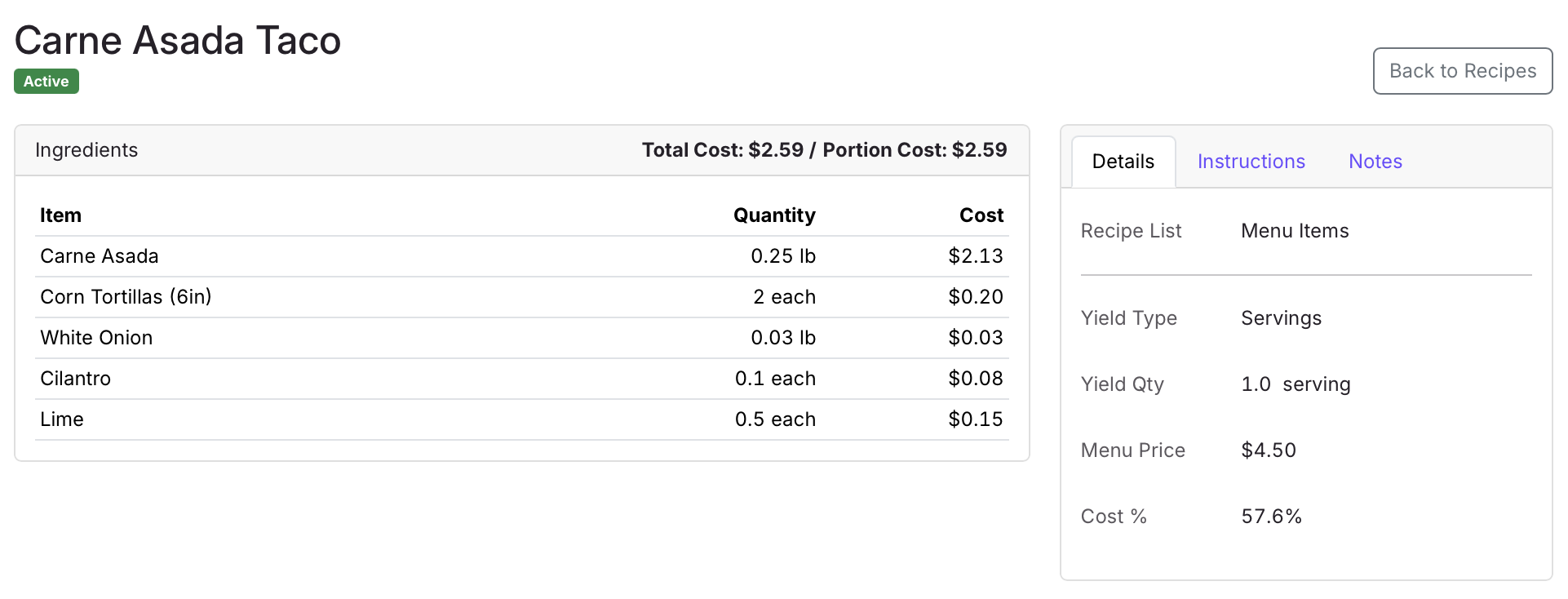
Donna calculates the true cost of every recipe from your actual vendor prices. Add your ingredients once, build your recipes, and Donna does the math—cost per portion, cost per batch, total plate cost.
When a vendor raises the price of chicken breast, every recipe that uses it updates automatically. You see which dishes are now upside down on margin before you’re caught off-guard at the end of the month.
Catch margin erosion the week it happens, not when it’s too late.
Count From Your Phone. Trust the Number.
Clipboards and spreadsheets lose counts, miss mistakes, and nobody trusts the totals.
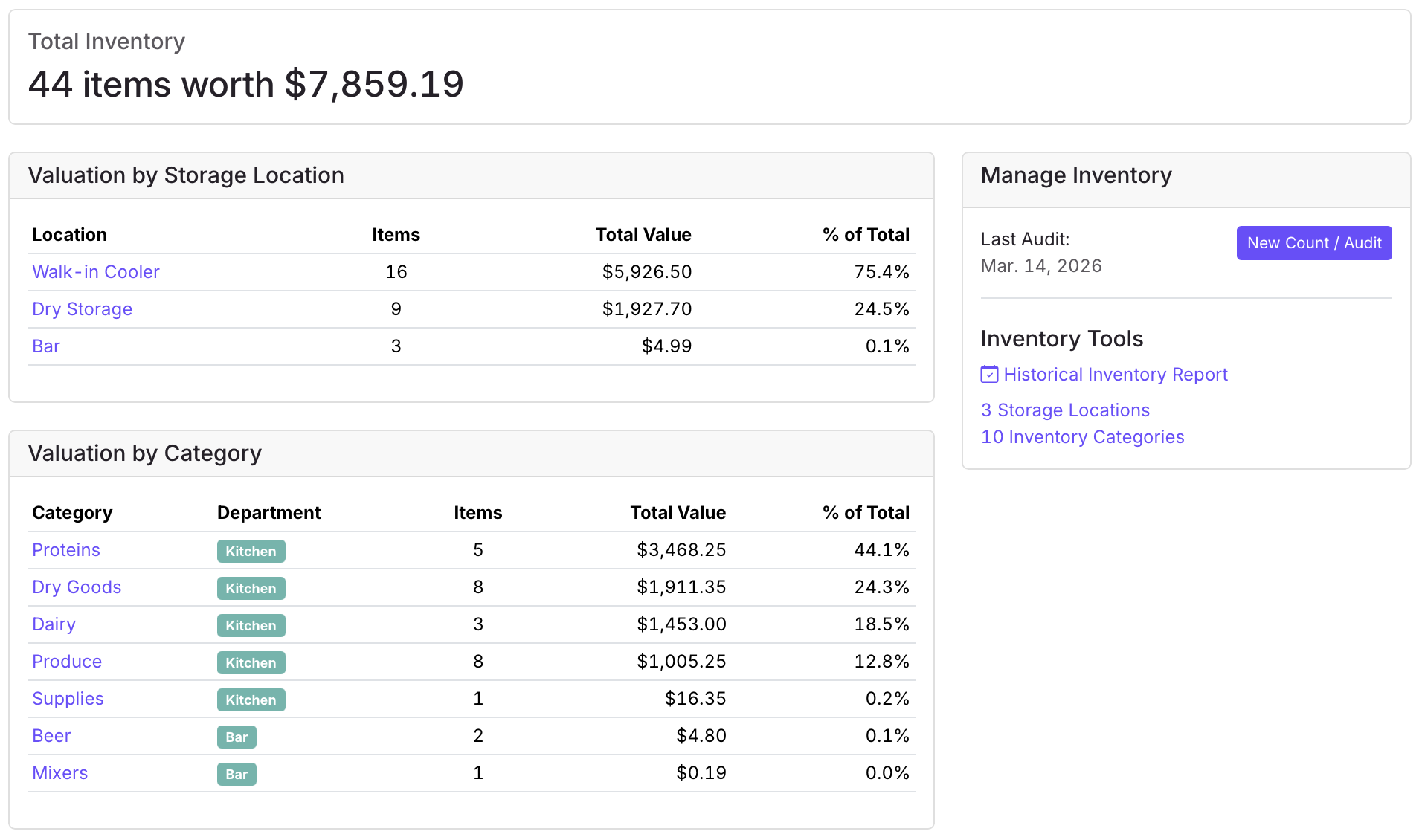
Donna gives you a mobile-friendly counting interface organized by storage location. Walk your walk-in, your dry storage, your bar—and tap in quantities as you go. Full audits let you count everything at once; spot counts let you check one area when something feels off.
Behind the counts, the ledger tracks every movement—counts, adjustments, depletions, replenishments—with running balances per item per location. Pull “as of” snapshots to compare the start of a period against the end. That’s how COGS is actually calculated: not from invoices alone, but from real inventory movement.
Expose shrinkage, over-ordering, and waste—before they eat your margin.
Order with a Paper Trail—Receive with Accountability
Ordering by text and phone call works until a delivery arrives short or an invoice doesn’t match.
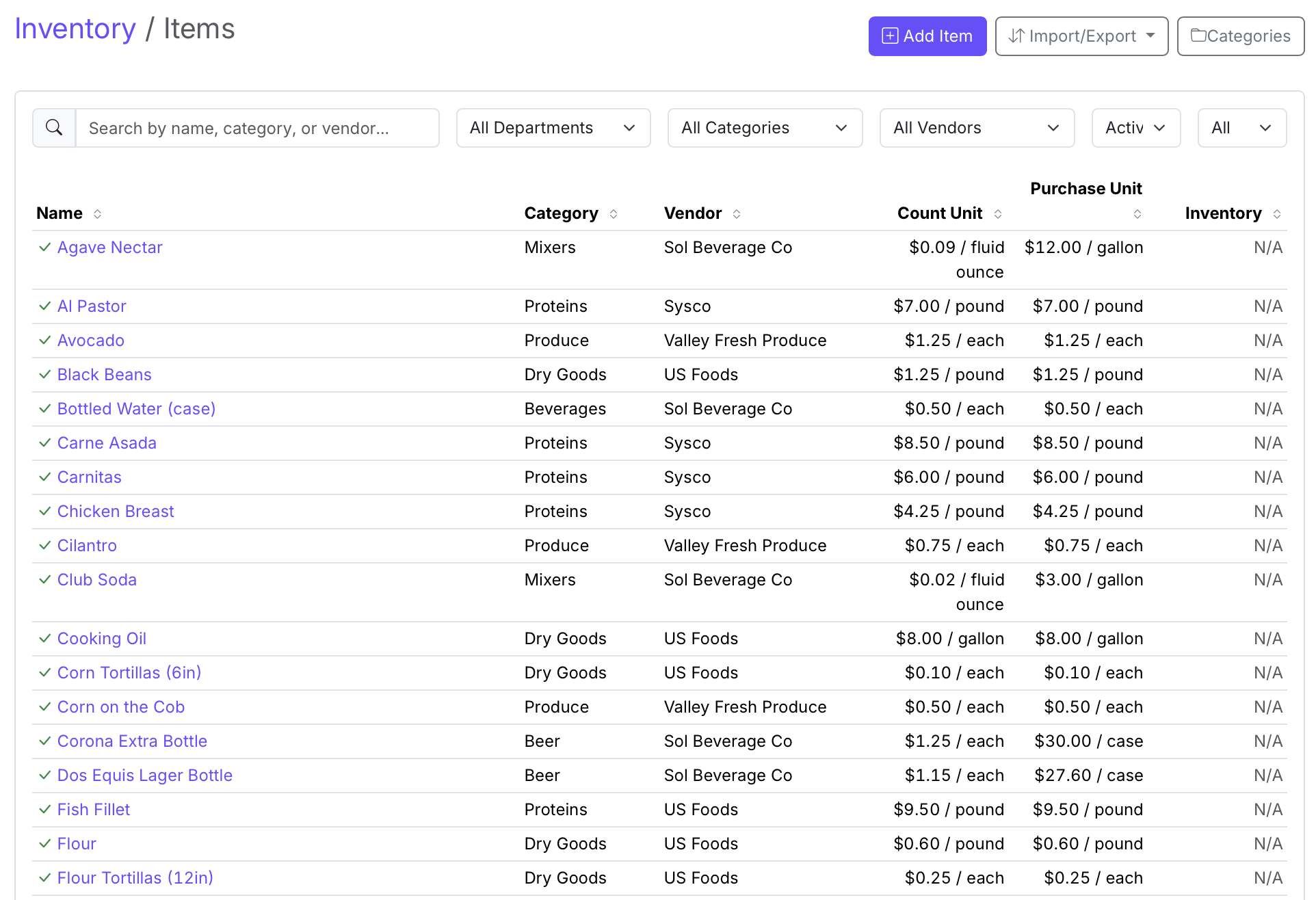
Donna’s purchase order workflow takes you from order creation through sending to the vendor, receiving items at the door, and matching against the invoice. Every discrepancy gets caught before the invoice gets paid. Ordering from several vendors at once? Build one list and Donna splits it into separate POs by vendor automatically.
Your vendor database sits underneath it all—contacts, payment terms, and the items you buy from each one—so a new manager placing an order doesn’t have to ask Carlos for the number.
Stop paying for what you didn’t receive. Accountability from order to receipt to payment.
Turn a 25-Minute Invoice Into a 2-Minute Confirmation
A 40-line vendor invoice means 25 minutes of someone reading paper and typing into a spreadsheet.
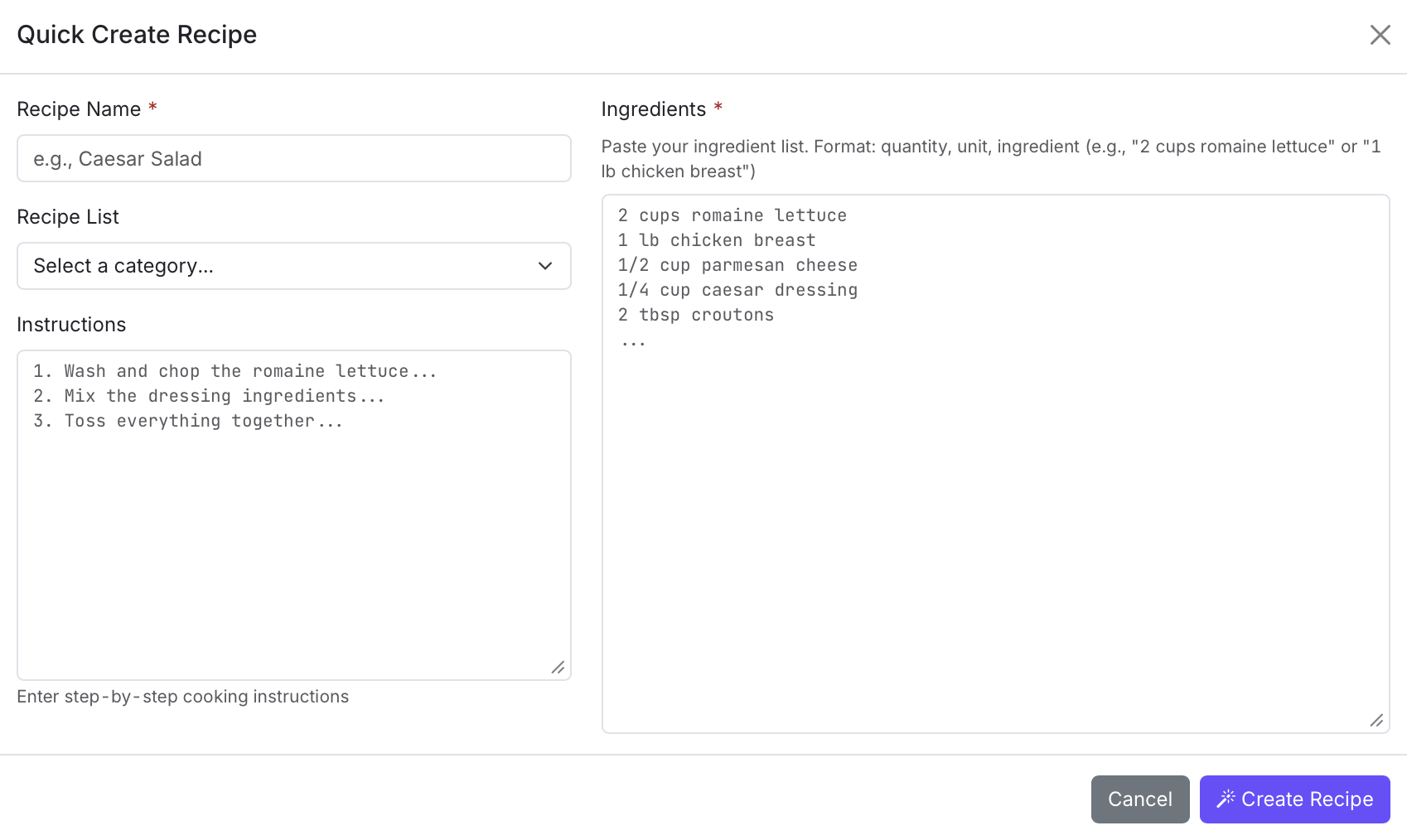
Upload the PDF and Donna’s AI reads it for you—extracting line items, quantities, and prices—then matches them to items already in your system. You just review and confirm.
Works with purchase order invoices and standalone invoices alike. When the AI isn’t sure about a match, it flags it for your review instead of guessing.
Cut invoice processing from a chore to a checkpoint.
The Full Picture—Not Just the Top Line
Revenue without expenses is a vanity number. You need to see what you actually kept.
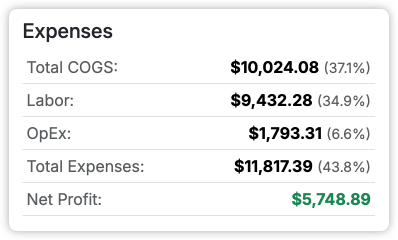
An operator who sees $80K in sales thinks they had a great month—until they realize they kept $8K. Donna connects to QuickBooks and syncs your expense transactions automatically, mapping COGS, labor, and operating expenses to Donna’s categories so they land right next to your sales.
Your accountant and your GM finally see the same numbers in the same place. No more reconciling spreadsheets before a meeting.
See your real profit. Stop flying blind on expenses.
All of It, in Every Account
One plan at $99 a month. No tiers, no add-ons, no feature gates—every account gets every report and every tool below.
Reports
- Dashboard
- Sales Heatmap
- Menu Engineering
- Product Mix
- Finance
Management Tools
- Items
- Recipes
- Inventory
- Purchase Orders
- Receivings
- Invoices
- Vendors
- Utilities
Frequently Asked Questions
How hard is setup?
Connect Square, pick your location(s), and Donna starts syncing automatically. No CSVs, no custom fields, no IT department required.
Do I need to export reports from Square?
No. Donna pulls the data for you every night and builds the reports automatically. You never touch a CSV.
Do I have to pick a plan or choose features?
No. Donna is a single product at one price. Every report and every management tool is turned on from day one—there is nothing to bundle and nothing to upgrade to.
Can my managers see this?
Yes. Team members are unlimited, so everyone is aligned on the same numbers. No more “my spreadsheet says different.”
What POS systems do you support?
Square today. More POS integrations are coming soon.
Can I do inventory counts on my phone?
Yes. The counting interface is mobile-friendly and organized by storage location. Walk your walk-in and tap in quantities as you go.
What happens when a vendor raises prices?
Update the vendor price once. Every recipe that uses that ingredient recalculates automatically, so you see the impact immediately.
Does the invoice AI work with any vendor?
Yes. Upload any vendor invoice as a PDF. Donna’s AI extracts the line items regardless of format. You review and confirm the matches.
Start Seeing Your Business Clearly
Connect your Square POS today. Your first insights arrive automatically—no spreadsheets, no hassle.
Have questions? Ask Donna in the app—plain-English answers, backed by your data.